
To generate a Unifinity application using UniForm, select "UniForm" from the menu bar under "Plugins" and then select "Excel Forms Import".
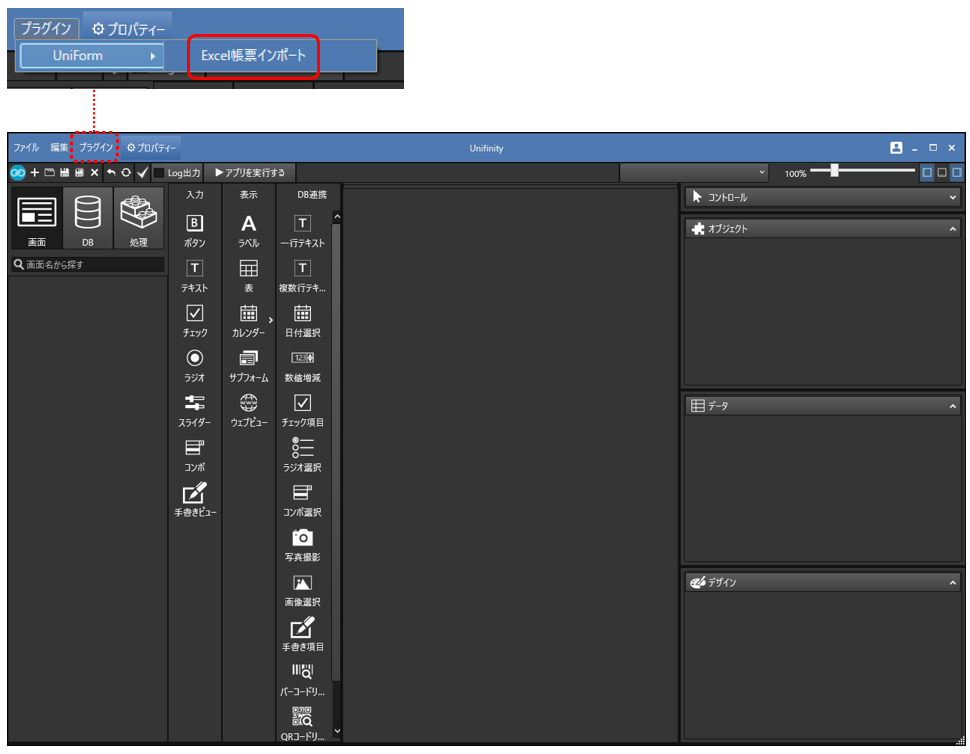
Excel form import
Each configuration file can be imported to generate a Unifinity application.

| item name | Description. |
|---|---|
|
Form (required) |
Click the "..." button to select the "form file" you have created. |
|
Definition (required) |
Click on the "..." button to set the "definition file" you have created. |
| stamp |
If you want to use a stamp when taking a picture, click the "..." button to set the "Stamp Definition File" you have created. |
| clear |
Clears the contents entered in the stamp field. |
| Use the contents of the stamp definition next time |
When checked, the contents entered in the stamp field are recorded and will be automatically entered the next time the dialog is opened. |
| OK |
Create a Unifinity application by importing the configured files. |
| cancel |
Closes the dialog. |