
To use UniForm, you need a "form file" and a "definition file.
To create a "definition file",UniForm definition file_templateand open it in Microsoft® Excel®.
The UniForm definition file template includes a form management sheet and a form definition sheet.
Filling out forms management sheets
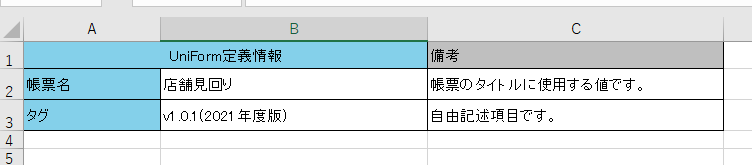
Fill in the "form name" and "tag" on the form management sheet.
Example of Entry
| item name | Description. |
|---|---|
|
Form name |
This will be the name displayed in the title of the application. |
| tag |
This item is used for administrative purposes only. |
Fill out the form definition sheet
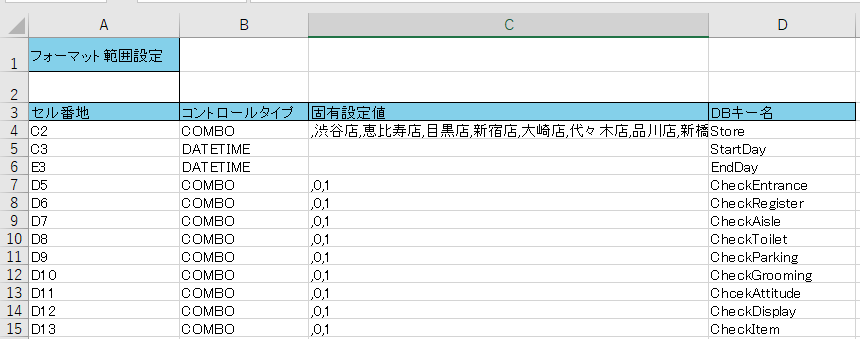
The form definition sheet sets the locations where user input is allowed for the layout created in the "form file".
Example of Entry
| item name | Description. | ||||||||||||||||||
|---|---|---|---|---|---|---|---|---|---|---|---|---|---|---|---|---|---|---|---|
|
Format range setting |
Set the range to import only a portion of the "form file. The range is described by connecting the upper left and lower right cell address names of the range to be imported with ":", as in "A1:D4". If blank, the entire page will be imported. |
||||||||||||||||||
| cell block |
Enter the name of the cell address of the part of the "form file" where the user will be entering data. |
||||||||||||||||||
| Control type |
Select the user input method from the combo box. The following are the input methods that users can use in the application
|
||||||||||||||||||
| native set value |
If the control type is "COMBO", enter the choices separated by commas. |
||||||||||||||||||
| DB key name |
Enter the name of the data entered in the application to be used when linking with external services. If blank, the name is the same as the cell number. |